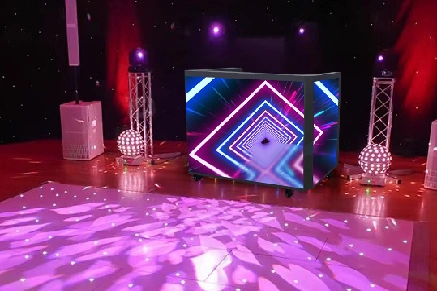
A standard DJ setup puts a table on stage and a flat LED screen behind it. The table does one job. The screen does another. They are separate pieces of equipment from different manufacturers, connected only by proximity. An integrated DJ booth with a built-in LED screen combines both functions into a single unit. The table is the screen. The three surfaces surrounding the DJ become the display.
This guide covers the features that separate a purpose-built DJ booth LED display from a generic screen-on-a-stand setup. Each section explains what the spec means in a live performance environment and why it matters when you are comparing products.
1. Refresh Rate and Live Performance
DJ performances are filmed. Club nights go on Instagram. Festival sets stream on YouTube and Twitch. Every camera in the venue, from the professional broadcast rig to the attendee’s phone, is pointed at the stage.
A standard LED panel with a refresh rate of 1,920Hz looks fine to the naked eye. Point a camera at it and horizontal scan lines appear across the screen. The effect is visible in both the livestream and every piece of user-generated content posted after the show.
A DJ booth display needs a minimum refresh rate of 3,840Hz to avoid scan lines on camera. At 7,680Hz, the screen reads as flicker-free on professional broadcast cameras, smartphone video, and slow-motion footage. This matters for DJs whose brand is built on visual content as much as audio. If half the Instagram stories from your set show a screen full of rolling bars, the investment in visuals is wasted.
When comparing products, verify the exact refresh rate spec. Labels like “high refresh” are meaningless without a number. 3,840Hz is the floor for live performance use. 7,680Hz is the standard for professional broadcast environments.
2. GOB Protection for Real-World Use
Clubs and touring environments are hard on equipment. Drinks spill. Road cases get knocked. Gear gets loaded in and out in tight time windows by crews who are under pressure. A standard LED panel with exposed surface-mounted diodes can lose individual pixels to scratches, impact, and moisture.
GOB (Glue-On-Board) protection covers the entire LED module surface with a transparent protective layer. This layer shields the LED chips from direct contact while remaining optically clear. The screen looks the same as an unprotected module. It survives the real world much better. Products like the U-Booth use GOB module encapsulation as the default, not an upgrade option.
For a DJ booth that sits at the center of a dance floor, GOB matters in specific ways. The booth surfaces are within reach of performers, stagehands, and occasionally enthusiastic audience members. Drinks placed on the booth surface will not damage the screen through a GOB layer. Modules can be wiped clean between sets without risk of dislodging individual LED chips. If the booth travels between venues, GOB protection reduces the number of dead pixels that accumulate over a touring season.
An unprotected standard panel in the same environment will show visible pixel damage within months. Make GOB a requirement, not an option, when comparing DJ booth displays.
3. 270-Degree Panoramic Display vs. Flat Screen
A flat screen behind the DJ creates a single viewing angle. The audience directly in front sees the content. The audience on the sides sees a thin edge. The people behind the DJ see nothing.
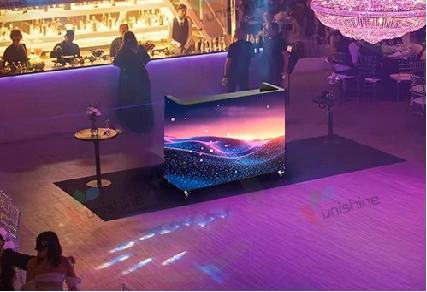
A three-sided panoramic booth wraps the display around the performer. The front panel faces the main crowd. The two side panels face the wings. The total viewing angle covers 270 degrees, leaving only the rear open for the DJ to enter and exit. From any position on the dance floor or in the venue, some portion of the display is visible.
This matters for two reasons beyond the obvious immersion benefit. First, it makes the DJ the visual center of the room regardless of venue layout. A flat screen works for a rectangular club with a fixed stage position. A three-sided booth like the U-Booth works for a festival tent, an L-shaped room, or a venue where the crowd wraps around the stage.
Second, it creates content opportunities that a single flat surface cannot support. The three panels can show synchronized content flowing across all three surfaces. They can show different content per side. The side panels can display branding and sponsor logos while the front panel shows the main visual content. A flat screen can only do one thing at a time.
4. Cabinet Size and Pixel Pitch Options
Cabinet Size
DJ booth size is not one-size-fits-all. A booth that works for a 200-capacity club is too small for a festival main stage. One that dominates a festival stage is impractical for a bar residency.
Two standard cabinet sizes cover most use cases. A compact configuration fits intimate venues and DJ booths positioned within the crowd. A larger configuration provides the visual presence needed for main stages and outdoor festivals. The U-Booth ships in two cabinet footprints, both using aluminum construction with the same modular panel system.
Pixel Pitch Selection
Pixel pitch determines how sharp the image looks at a given distance. For a DJ booth, the relevant distance is the closest audience member, not the size of the room. Someone standing at the front of the crowd is 2 to 3 meters from the booth surface even in a large venue.
Three factors determine the right pitch for a DJ booth display:
Viewing distance. At 2 meters, a P2.5 panel shows individual pixels to anyone looking closely at the screen. Text and logos on the booth surface will look slightly soft. At 4 meters, P2.5 looks sharp. At 8 meters, the same P2.5 panel looks identical to a P1.5 panel because the human eye cannot resolve pixels that small at that distance. Paying for a finer pitch than the viewing distance requires adds cost without visible improvement.
Content type. A DJ booth that primarily displays motion graphics, abstract visuals, and color washes can use a coarser pitch. Motion blurs the pixel structure. A booth that displays text, artist logos, sponsor names, or social media handles benefits from a finer pitch. Text needs sharp edges to be readable. If branding is the primary content on the booth, choose a pixel pitch that keeps logos crisp from the closest audience position.
Mixed distances. Most venues have audiences at multiple distances. Front-row attendees are close to the booth. The back of the room is far. The pitch must satisfy the closest viewer because that is where the pixel structure is most visible. A P2.0 pitch looks good at 2 meters and looks identical to a finer pitch at 8 meters. A P2.5 pitch shows its limit at 2 meters.
The table below matches pixel pitch to typical DJ booth use cases:
| Pitch | Closest Audience Distance | Typical Venue | Content Type |
| P1.25 to P1.5 | 1 to 2 meters | Intimate club, booth within audience reach | Brand logos, text, sponsor names, social handles |
| P1.8 to P2.0 | 2 to 4 meters | Mid-size club, standard stage separation | Motion graphics with occasional text, branding |
| P2.5 | 4 to 8 meters | Festival stage, large venue | Pure motion graphics, abstract visuals, color fields |
Choosing the coarsest pitch that looks sharp from your closest audience position is the most direct way to manage hardware cost. Every jump from P2.5 to P2.0 to P1.5 adds LED chips per square meter and adds cost. Only pay for the pixels your audience can actually see.
5. Shape Configuration: Arc, Right Angle, or Custom
Three-sided DJ booths come in three geometric configurations.
An arc configuration curves the front panel outward in a gentle convex arc. The two side panels follow the curve. This shape feels organic on stage and produces a softer visual profile that blends into lighting and set design. It works well for club residencies and venues where the booth is a permanent installation.
A right-angle configuration uses three flat panels meeting at 90-degree corners. This shape looks architectural and structured. It works well for corporate events, award shows, and productions where clean lines match the stage design language. The sharp corners also create a defined performance zone that separates the DJ from the surrounding space.
A custom configuration routes panels to non-standard dimensions. This is relevant for venues with unusual stage geometry, set designs that integrate the booth into a larger scenic structure, or touring productions that need the booth to fit within a specific footprint dictated by truck pack dimensions.
The choice between arc and right-angle is primarily aesthetic. The LED panel specification, refresh rate, and GOB protection are identical regardless of shape. Choose the geometry that matches the visual style of the events you play.
6. Wireless Control and Operational Details
A DJ booth display needs to change visuals throughout a set without the DJ leaving the booth or delegating to a technician. Wireless dual-control allows content management from both a mobile app and a PC. The DJ can trigger visual changes from a phone on the booth surface. A VJ or lighting operator can manage the same system from a laptop at FOH.
Two practical features that affect nightly operation deserve attention during product comparison. Built-in storage drawers inside the booth keep cables, backup USBs, and personal items accessible but out of sight. An ergonomic foot groove along the bottom edge gives the DJ a comfortable standing position through multi-hour sets. These are not spec sheet highlights, but they determine whether the booth is pleasant to perform in across an entire residency or tour.
7. Conclusion
When you evaluate DJ booth LED displays, prioritize the specs in the order they become unfixable after purchase. Refresh rate comes first. You cannot fix a 1,920Hz panel that scans on every camera pointed at the stage. GOB protection comes second. Damaged pixels from impact and moisture accumulate over time and cannot be restored. Pixel pitch comes third. Get it right for your closest audience distance, which means measuring that distance before shopping. Shape configuration, cabinet size, and wireless control features come last. These are preferences that can be compromised on without breaking the core function of the booth. If a product cannot state its refresh rate, skip it. If GOB is an upgrade option rather than standard, factor the added cost into the total.
FAQ
Q1: Can a DJ booth LED display be used outdoors?
Indoor-rated booths with IP30 protection should only be used indoors. For outdoor festivals or events, the booth needs weather protection such as a covered stage or tent structure. Direct rain or high humidity will damage indoor-rated electronics.
Q2: How is the content on the booth controlled during a live set?
Wireless dual-control allows content management from both a mobile app and a PC. The DJ can change visuals from a phone on the booth surface without leaving the performance position. A VJ or lighting operator can manage the same system from a laptop at front of house. The two control points operate simultaneously on the same content system.
Q3: What happens if an LED module fails during a performance?
GOB-protected modules are unlikely to fail from impact during a show, but pixel failures from other causes can occur. Having a spare module and knowing how to swap it is worth the preparation. The module replacement process varies by product. Confirm the procedure with the manufacturer before the first live use.
Q4: What does setup and teardown involve?
The booth is a modular assembly that ships in sections. Setup includes positioning the cabinet frames, connecting the panel modules, running power and data cabling, and calibrating the display. A two-person crew can typically handle the process. The exact time depends on booth size, crew experience, and whether the configuration is arc or right-angle. Arc configurations take slightly longer due to the curved panel alignment.
Q5: Where does the DJ’s equipment go in an integrated booth?
The booth includes built-in storage drawers for cables, backup USBs, and small accessories. The main DJ equipment (mixer, CDJs, laptop) sits on the booth tabletop surface. The table area is designed to accommodate standard DJ gear dimensions. Confirm the exact tabletop dimensions with the manufacturer to verify your specific equipment fits.